
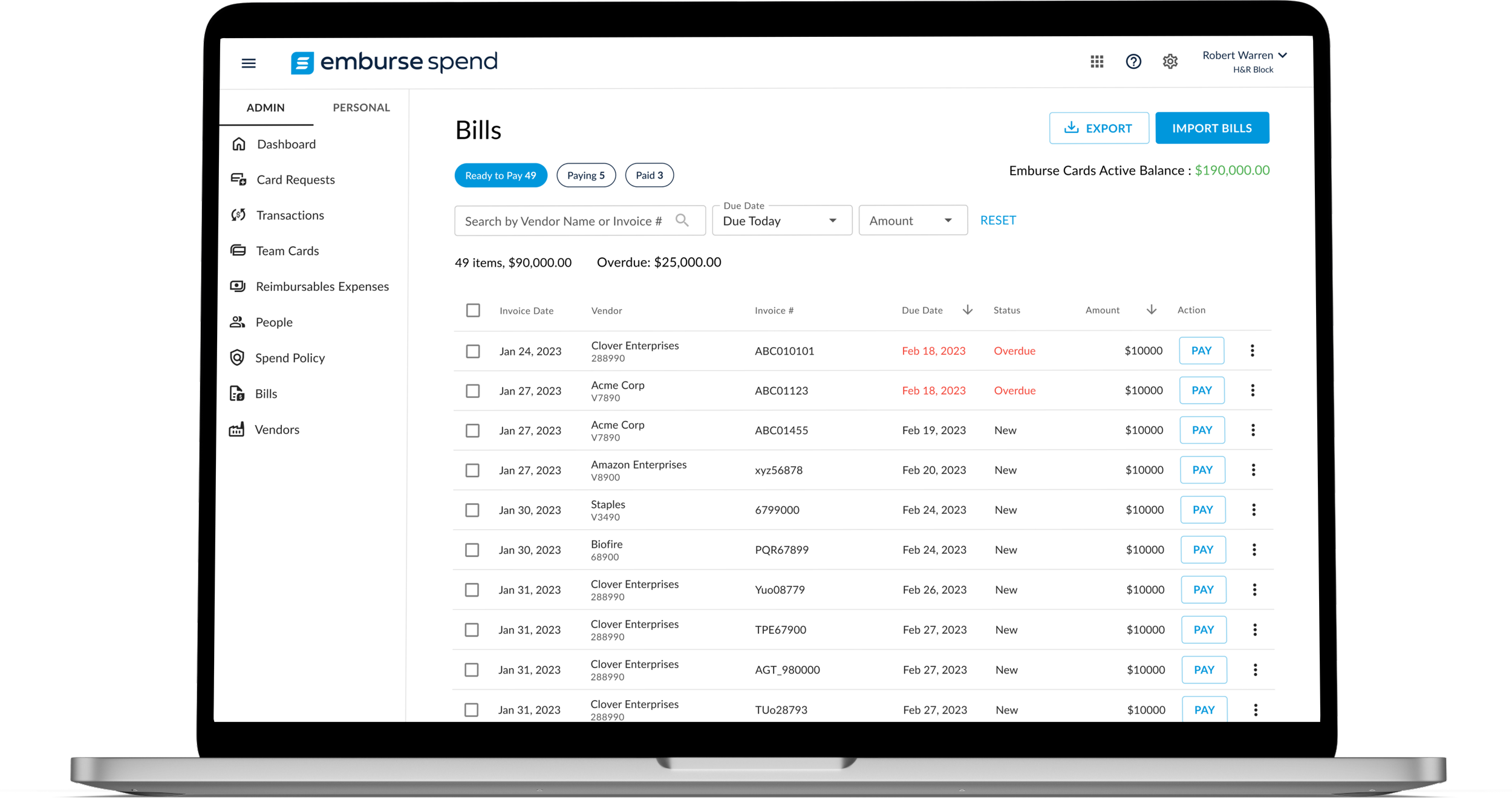
Designed Bill Pay feature for Emburse Spend to streamline vendor payments using virtual cards.
I led the design of “Bill Pay” from 0-1, from researching, and identifying problems, to designing and handing off for implementation. The Bill Pay feature is crafted to boost the Spend platform's functionality and further streamline financial processes for AP (Account Payable) clerks and finance admins. It enables seamless vendor payments via virtual cards and allows customers to manage all spending, including bill-based transactions, within the Spend platform.

ROLE
Product Designer ||
WEBSITE
CONTEXT
Emburse is a fintech company specializing in expense management and spend optimization solutions. Emburse Spend is a spend management platform designed to empower finance administrators in efficiently overseeing employee-driven vendor spend (like software subscriptions and digital marketing expenses.) Through issuing virtual and physical cards with customized usage limits and controls, Emburse Spend enables proactive spend approval, providing customers with real-time visibility and control over their teams' expenditures.
WHY BILL PAY?
According to our research, over 10% of our customers expressed a need for a vendor payment feature within Emburse Spend to avoid the hassle of managing additional SaaS products. Additionally, competitors are offering this feature, raising customer expectations. Sales reports further highlight that our current lack of this capability is causing us to lose deals.
GOAL AND SUCCESS METRICS
Simplify and expedite vendor payments, enhance flexibility, ensure payment security, and ultimately boost revenue.
A revenue increase of $800K from new client onboarding following the Bill Pay feature launch
A 14% active adoption rate of the Bill Pay feature among existing customers
RESEARCH
Understanding current vendor bill payment processes and challenges through interviews with 6 finance admins across different companies
Aware that competitors already offered similar features, we initiated interviews to understand our customers' specific needs, how they currently handle vendor bills, and expectations to refine our offering effectively. 6 customers were selected randomly from a pool of 30+ interested participants.
Current Workflow: Across these six customers, the accounts payable process appears fragmented, requiring separate systems for invoice intake, review, and approval (typically an ERP), as well as for payment processing (e.g., Bill.com)
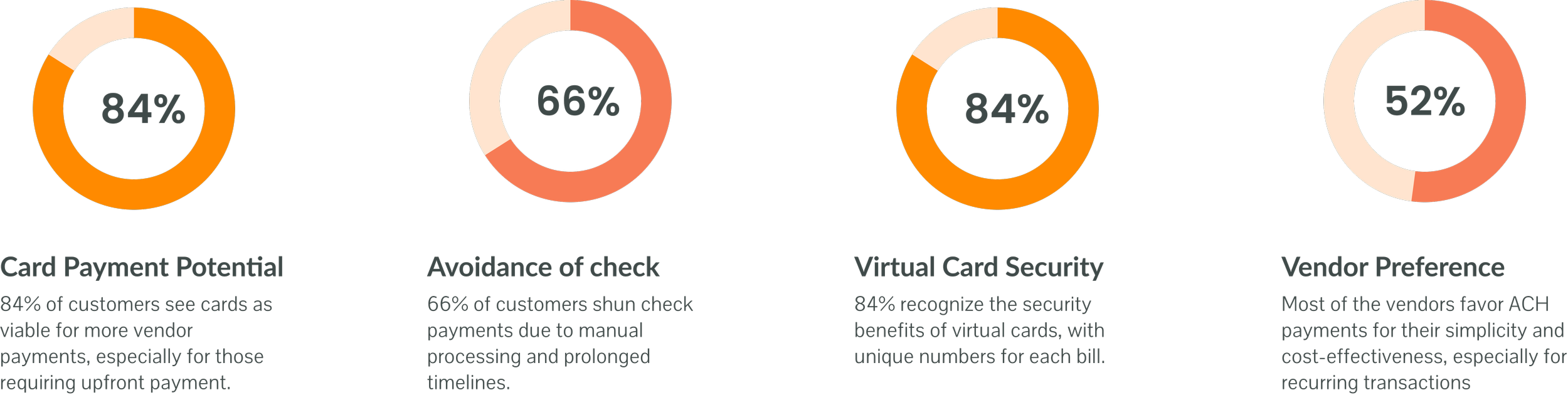
Problems Identified:
Inefficient Manual Processes: Customers face time wastage and a higher risk of errors due to manual operations in handling payments.
Rigid Payment Scheduling: The inability to schedule payments flexibly leads to inconveniences in cash flow management.
Challenges in Invoice Management: Locating urgent invoices is cumbersome, often resulting in delayed payments and disrupted cash flow management.
Issues with Vendor Information: Outdated or incomplete vendor details complicate the verification process prior to making payments.
Drawing on research insights, I designed a bill payment journey map that facilitated effective feature prioritization for the MVP.
FEATURE PRIORITIZATION
To prioritize what features would create the most value in the shortest timeframe, I collaborated with the PM, research, and engineering team to strategize a plan for MVP release. Drawing from research insights and workflows, I developed a journey map that consists of 2 major parts: “Bill intake and approval” and “Releasing payment to vendors”. We ultimately decided to prioritize the latter part of the workflow, concentrating specifically on vendor payment processes (Emburse Spend customers already have a process outside Spend to receive and reconcile invoices, but lack an easy way to pay invoices by card.)
MID FIDELITY WIREFRAMES
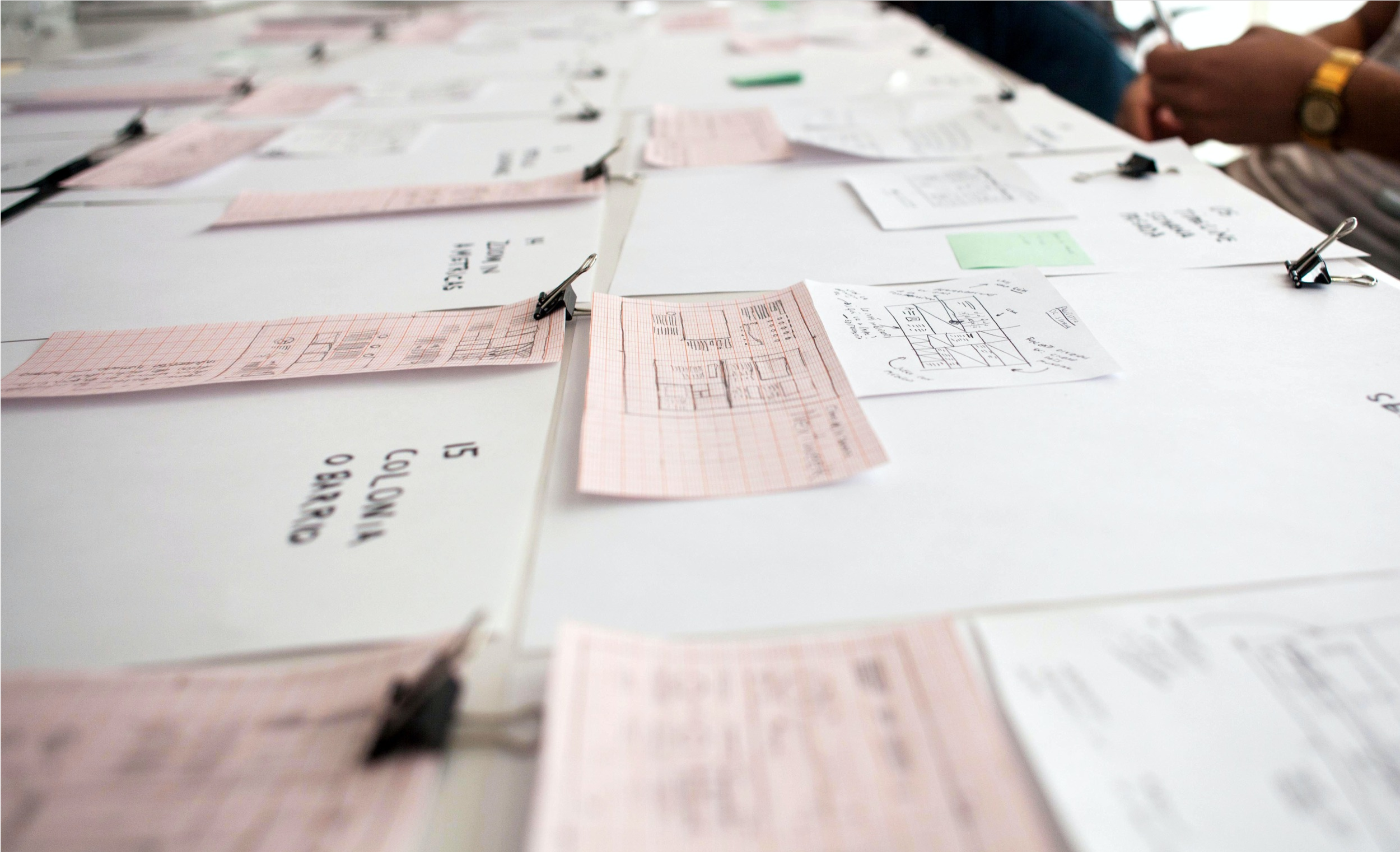
Design began with the Mid-Fi wireframes which enabled me to communicate my vision effectively to stakeholders and Engineers.
We wanted to ship fast, so I lowered the engineering lift by balancing existing patterns and net-new designs. I worked with my engineer to find and apply existing patterns in the new context.
USABILITY TESTING
Despite the tight schedule, I prioritized evaluating essential workflows—including importing bills, issuing virtual cards, vendor email, and overall design—with a sample of 6 finance admins/AP clerks, empowering data-driven decision-making and enhancing user experience.
TASK 1
Users were prompted to review the bill pay home screen and share their initial impressions. Were there any areas that stood out for improvement or information that seemed missing?
TASK 2
Users were instructed to proceed with paying an invoice and then asked if they noticed any missing elements or areas for improvement.
TASK 3
Users were tasked with importing bills and then asked for general feedback on the process. Was there anything about the flow that they would like to change or improve?
FINAL DESIGN
Following the usability testing, I refined designs and transitioned to developing high-fidelity wireframes.
Testing the usability of my initial design results enabled me to gain a deeper understanding of users' perspectives and how to improve the design to meet their needs. I began to produce multiple different variations of wireframes. I then put the designs in front of our Internal Account payable Admins and Product manager for feedback.
ADMIN VIEW FOR BILLS
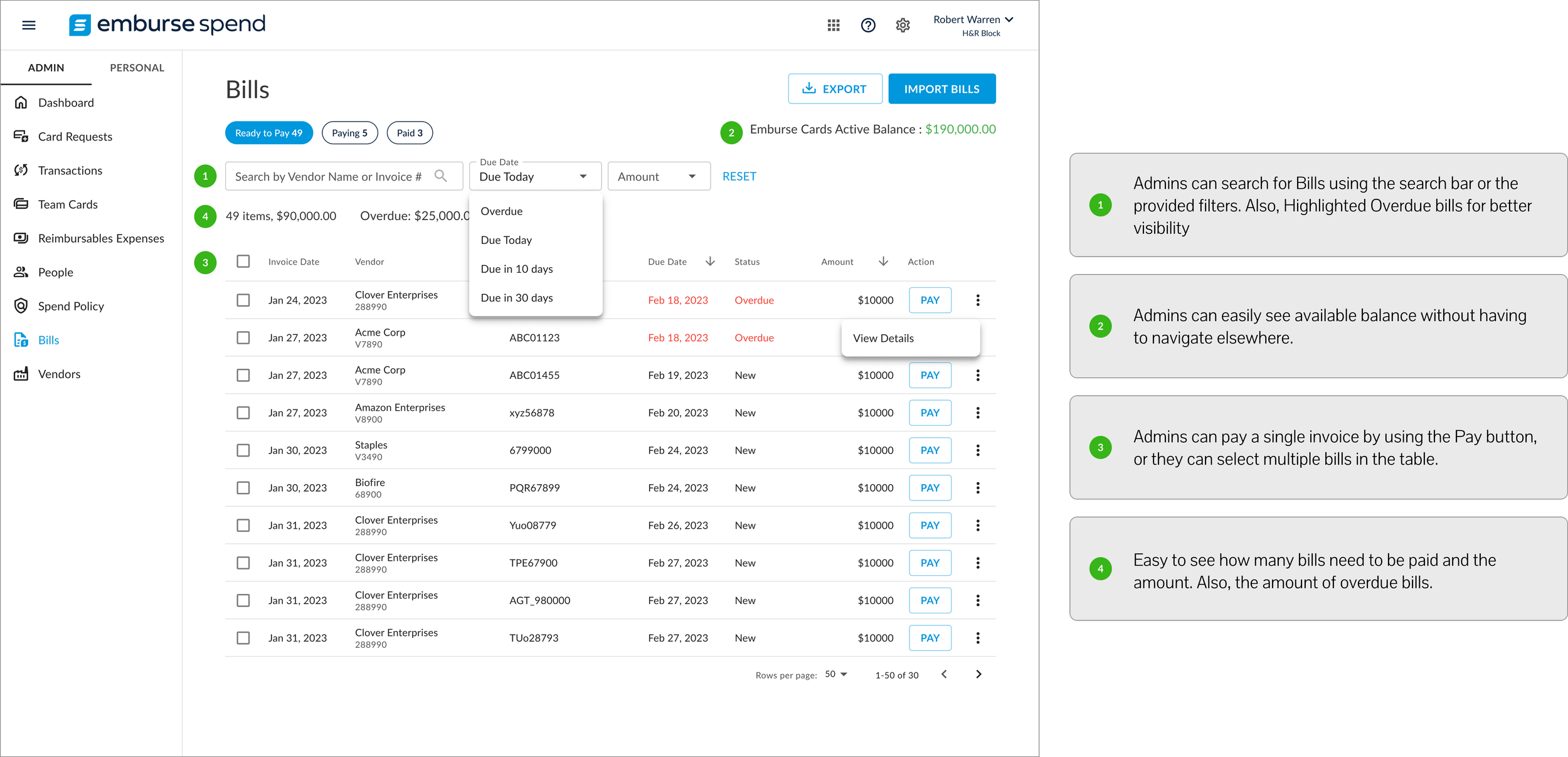
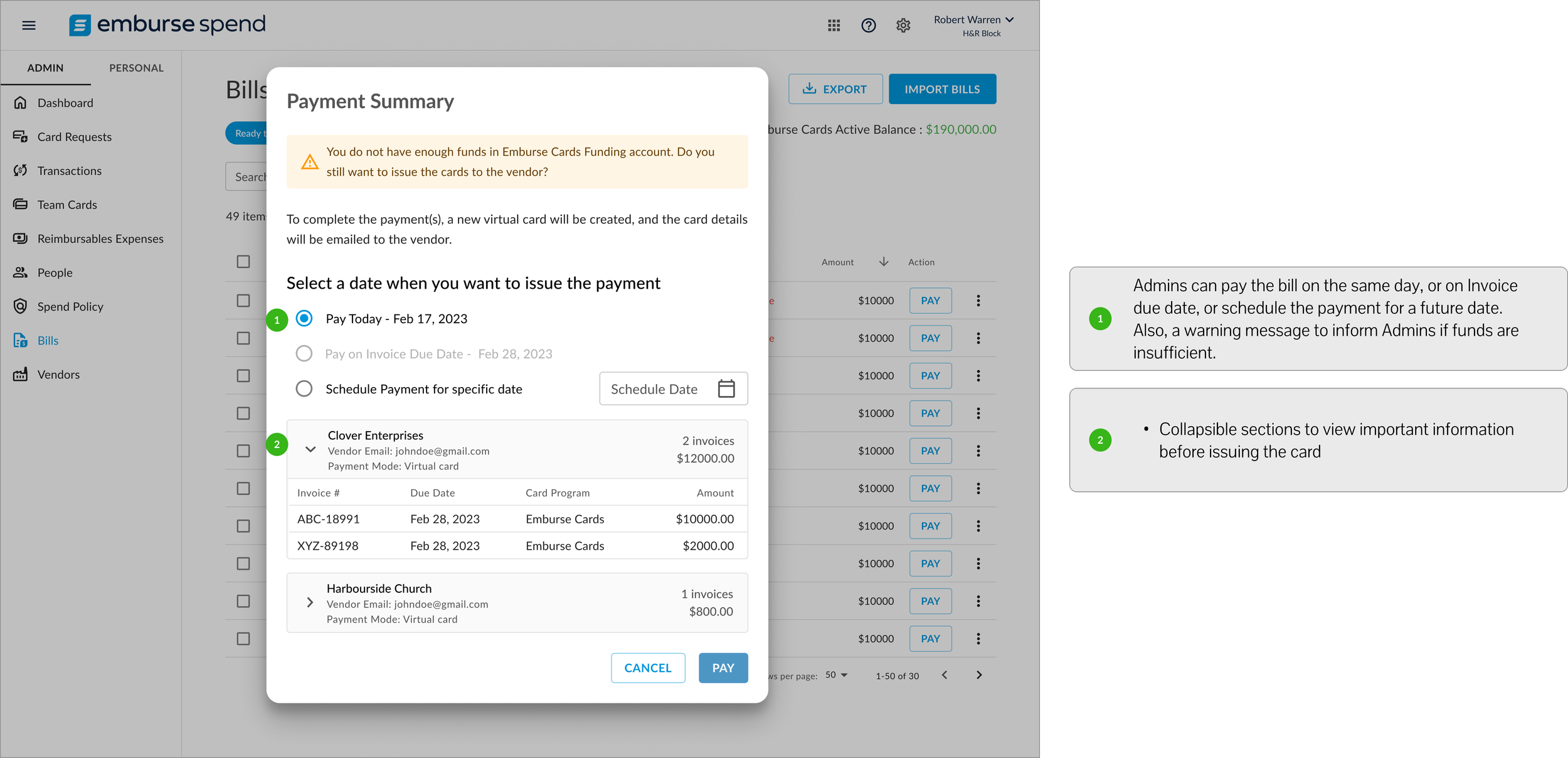
Admins now have access to a comprehensive vendor bill management system. The initial MVP offers features enabling them to view, manage, pay, and track vendor bills efficiently. This includes the ability to pay single or bulk invoices, with options to pay immediately, on the due date, or schedule payments for later

ADMIN VIEW FOR VENDOR PAGE
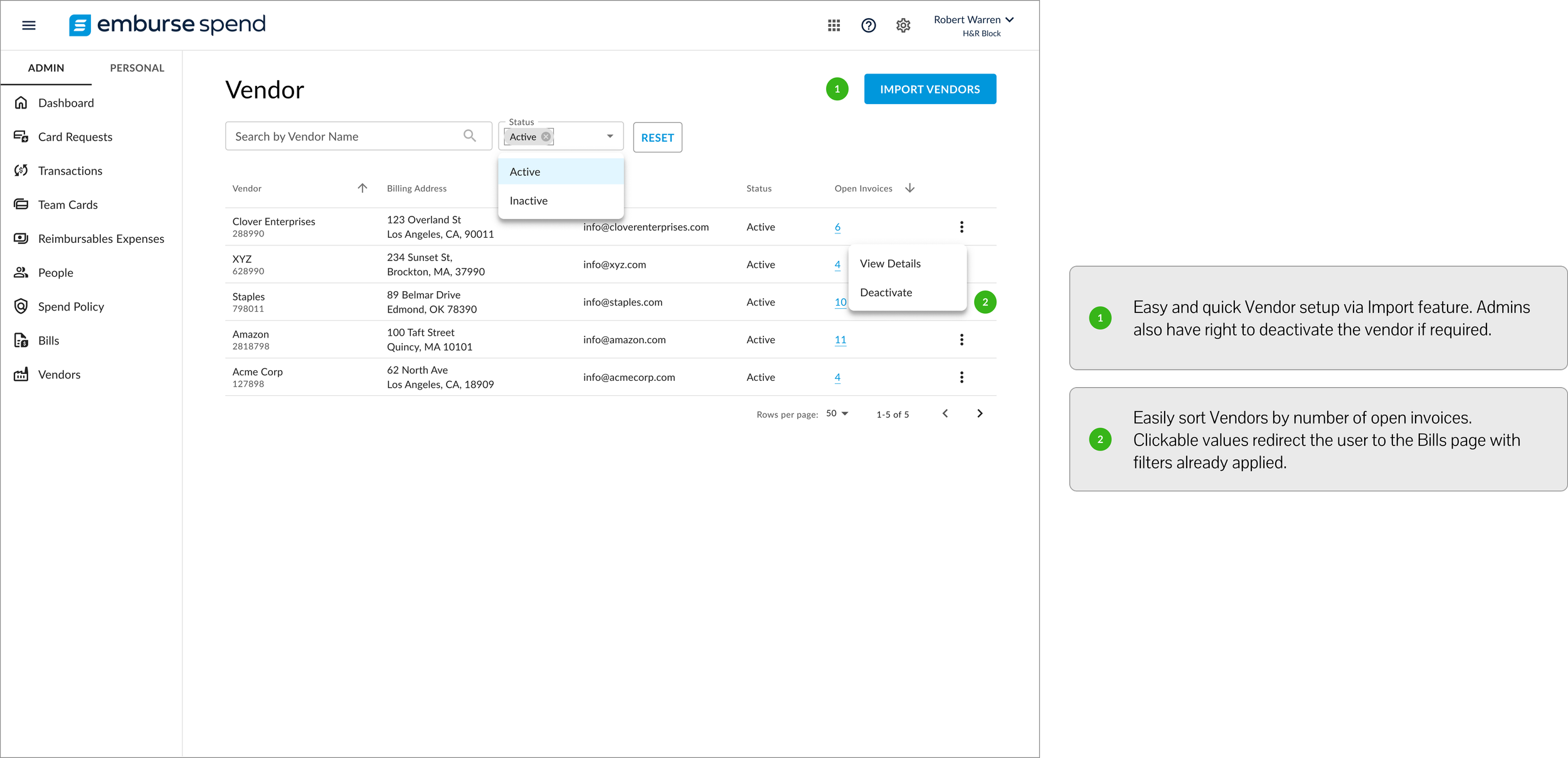
From the vendor page, admins can get a holistic view of all the vendor’s details, view open invoices linked to each vendor, and deactivate vendors from the system if necessary.
VENDOR ACCEPTANCE WORKFLOW
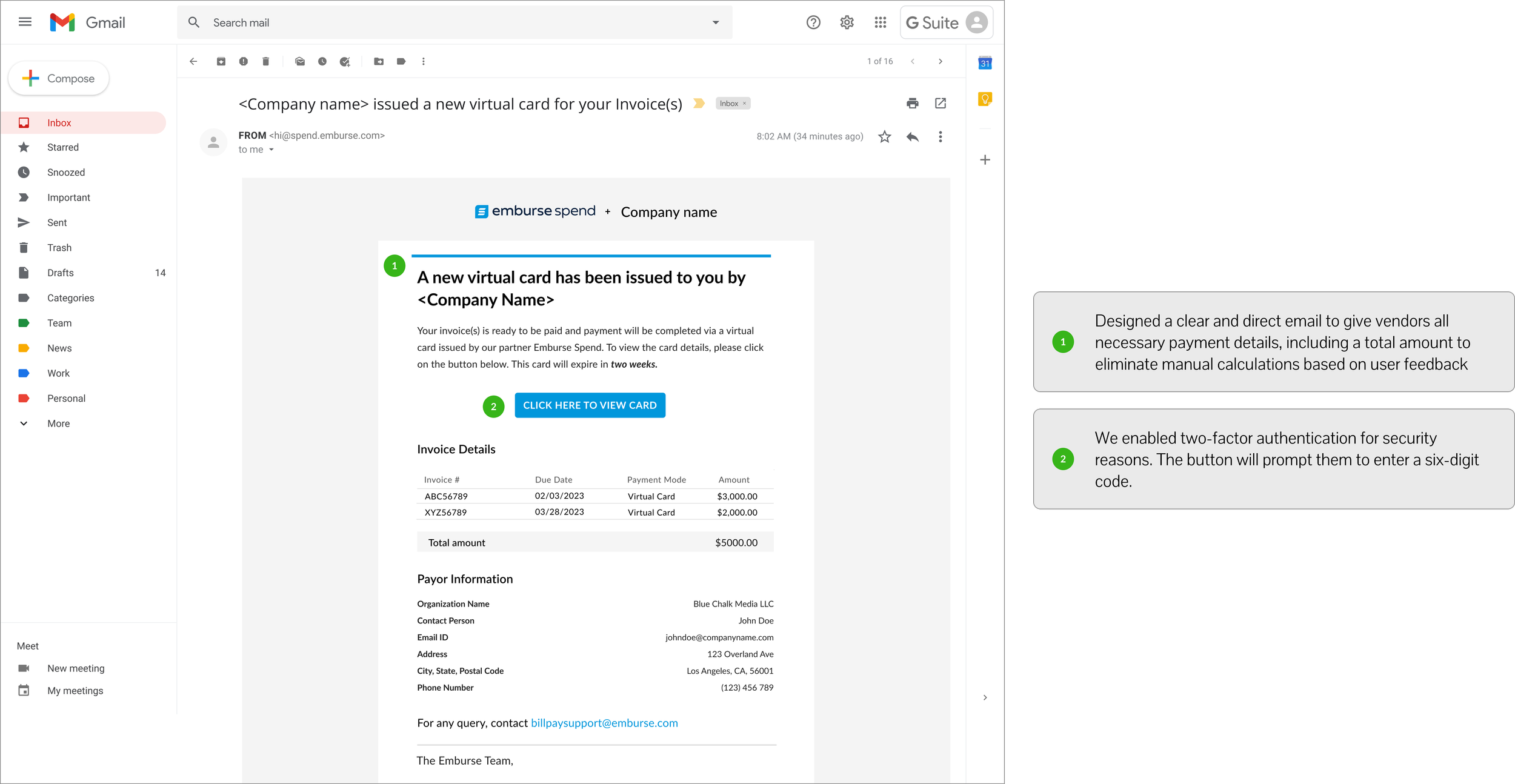
A new virtual card is generated for each vendor on the scheduled payment day. An email notification is sent to the vendor, providing details of the issued card. To access card details, vendors are directed to a two-factor authentication screen for enhanced security.
Pay a bill and track it’s status
Bulk Payment Workflow
Import Bills Workflow
What customers are saying post launch -
Working Well
“The interface is pretty intuitive.”
“Seems pretty intuitive. I like being able to drill down. I like the easy filter options.”
“I like the flexibility of picking and choosing what gets paid and when. Being able to schedule the payments in advance is awesome.”
“It would also be great to see a dashboard of all upcoming/scheduled payments.”
“System is fairly easy to navigate.”
Needs Improvement
“Increase clarity around when the payment will hit the Vendor’s account, and how long they have to complete the payment”
“Vendor type might be nice. If cash was tight and we were trying to decide who took priority, being able to filter on the type of vendor would help (i.e. Subcontractor, Utility, Service, Government, etc.)”
“Invoice traceability information: who was the approver, what department made the purchase, what type of spend it was. More aligned with data reflected in traditional invoice approving software.”
Learnings
Bringing visuals is helpful when sharing initial ideas with cross-functional partners. By sharing low-fidelity explorations and visual references, I could better communicate with engineers, product managers, and UX researchers about the feasibility and timeline.
Constant iterations based on feedback enhanced usability and functionality before launch.
Each phase of the design, from low-fidelity sketches to high-fidelity wireframes, underwent iterations based on internal and external feedback. This approach helped in fine-tuning usability and functionality before the final launch.